You create a Java object with just a few fields. Add up their sizes, and it seems as though the object should be tiny. Yet the space it occupies on the heap can be much larger. Where do the extra bytes come from?
In Lesson 2, we looked at the memory consumed by the entire JVM process. Now let’s move inside that map, all the way down to one object in the Java heap. The key idea is Java fields ≠ total object size. Your fields hold application data; HotSpot also needs information to manage the object, and space to satisfy its layout rules.
Zoom from the heap into one object
The diagram separates three parts of an ordinary heap object. Start with the heap boundary, then follow the selected object down into its anatomy.
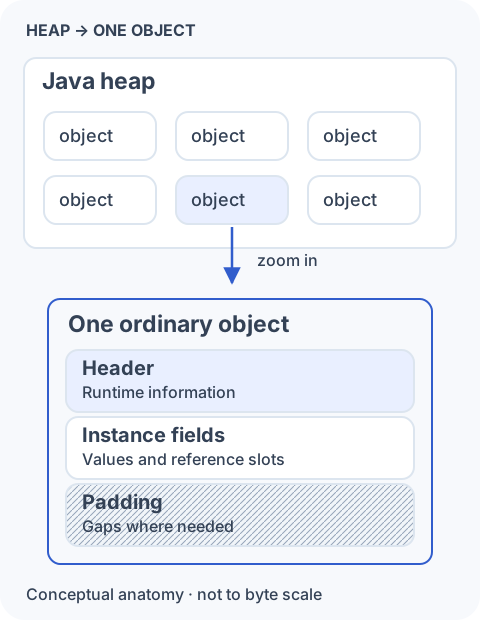
The header holds runtime information. Instance fields hold primitive values and references belonging to this object, including inherited instance fields. Padding fills gaps required by the chosen layout and alignment. Static fields belong to the class rather than being repeated in each instance.
We’ll use ordinary class instances throughout this lesson. Arrays have additional layout details, including a stored length. And, as we saw in Lesson 1, HotSpot can sometimes optimize an allocation away; here we are reasoning about objects that actually occupy heap space.
Start with the object header
Let’s give the diagram something concrete to describe:
class User {
    int id;
    boolean active;
    Object ref;
}
Even before counting those three fields, the object needs a header. For our working model, assume 64-bit HotSpot, conventional object headers, compressed class pointers, compressed object references, and 8-byte object alignment. These are implementation settings, not Java language guarantees.
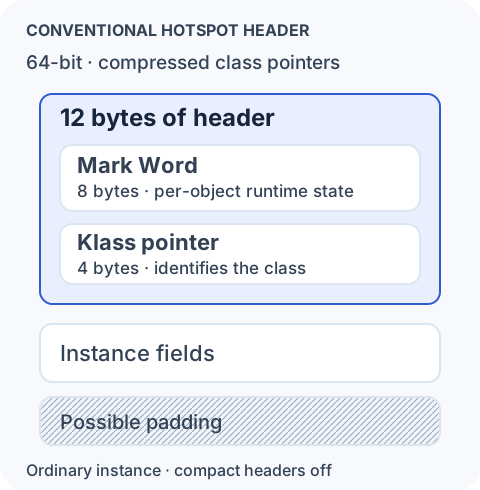
The Mark Word carries per-object runtime state. HotSpot uses it for locking state, identity-hash information, and GC-related information such as object age or forwarding state, depending on the runtime mode and collector. These uses can overlap or change over the object’s lifetime; they are not independent fields that all hold the same kind of information at every moment.
We don’t need the individual bits yet. Their arrangement depends on the JVM version and configuration. The useful idea is that some information needed to manage an object lives right beside its application data. An instance of class Empty {} therefore still has a header and alignment overhead; no declared fields does not mean zero bytes.
The JVM must also know the object’s class
The second part of our conventional header is the Klass pointer. It lets HotSpot identify the runtime representation of the object’s class. Follow the arrow across the boundary below: the object is on the heap, while the class metadata is maintained separately.
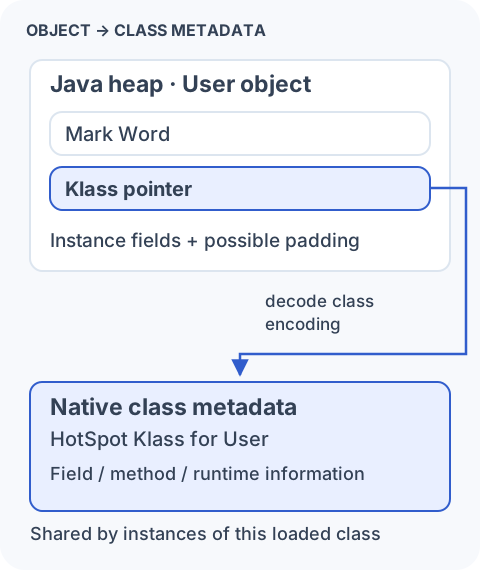
That metadata describes the loaded class, including information about its fields, methods, and runtime behavior. In HotSpot it is associated with native class metadata storage, which we met as Metaspace in Lesson 2.
There are two related representations here. When Java code evaluates User.class or calls user.getClass(), it receives a java.lang.Class object. This is an ordinary heap object that gives application code and reflection APIs a Java-level view of the loaded User class. HotSpot often calls it the class’s mirror.
Behind that mirror, HotSpot keeps its internal Klass structure in native class metadata. The JVM uses this structure for work such as locating instance fields, finding methods, and checking types. The Class object and the internal Klass structure describe the same loaded class, but they serve different sides of the runtime and are linked rather than being one object:
Java code                         HotSpot internals

User.class  ────────────────►  java.lang.Class object
                                  in the Java heap
                                         │
                                         │ represents the same loaded class
                                         ▼
                                  HotSpot Klass metadata
                                  in native memory
So the heap-resident Class object is the Java-facing handle for the class. It does not contain every piece of metadata HotSpot needs to execute and manage instances of that class.
With compressed class pointers, the header contains a compact class encoding that HotSpot can decode to find its internal Klass structure. This is different from an application field such as User.ref: one identifies a class; the other refers to another heap object.
Then come your fields
Primitive fields store values directly in the instance. A reference field stores a reference, not the body of the object it refers to. Consider:
class Person {
    int age;
    double salary;
    Address address;
}
If we create a Person and assign a newly created Address to its address field, there are two separate objects. Trace the reference slot inside the first box to the second box.
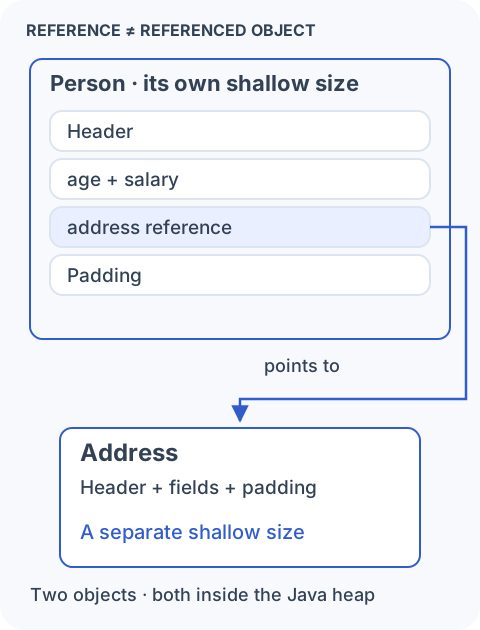
The shallow size of Person counts that one object’s header, primitive fields, reference slots, and padding. It does not include the Address object’s body. Address has its own header, fields, and padding. If address is null, the reference slot still occupies space in Person, but there is no object to follow through that slot.
Several people could also refer to the same address. Counting an entire Address for every reference would count that shared object more than once. This is why reference ≠ referenced object matters when estimating memory.
We’ll later distinguish reachable graph size from retained size, which concerns what would become collectible if a particular object stopped keeping it alive. Retained size is not just shallow size plus everything reachable; other paths can keep shared objects alive.
You replace a small Address with a larger one. Does Person grow?
Its shallow size stays the same under the same layout: the address field still contains one reference. The separate object graph can occupy more memory. The old Address is not necessarily collectible, because another reference might still keep it reachable.
Why objects contain padding
Return to User. Under our stated configuration, its header contributes 12 bytes and its fields contribute 9: four for id, one for active, and four for ref. That gives us 21 bytes of header and field storage, before gaps.
HotSpot commonly aligns object starts on 8-byte boundaries. With that alignment, the object’s size must be a multiple of eight. Twenty-one rounds up to 24 bytes. Read the three rows below as eight byte slots each.
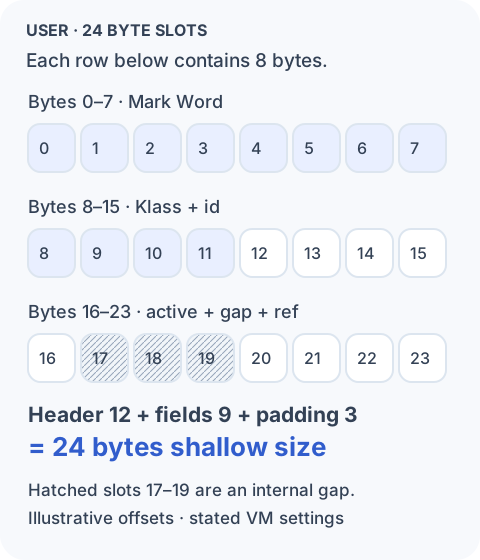
Padding can appear between fields, as well as at the end of an object. Fields have their own alignment needs too, so rounding the sum of field sizes is not a universal layout calculator. In this example the reference can occupy bytes 20–23 after a three-byte internal gap; the full object still ends on a 24-byte boundary.
The byte budget is:
Conventional header      12 bytes
int id                    4 bytes
boolean active            1 byte
Object reference          4 bytes
Padding                   3 bytes
--------------------------------
User shallow size        24 bytes
This is an illustrative layout under explicit assumptions, not a guaranteed offset table or output from a profiler. The stable lesson is the accounting: header + instance-field storage + padding. Reference slots are part of instance-field storage, not an extra charge on top of it.
Now imagine adding boolean verified. If HotSpot can fit it into what was padding, the object can remain 24 bytes. A small field in another layout might cross the next boundary and increase the object by eight bytes. Field size and object-size growth are not always one-to-one.
Source field order is not the memory layout contract
It is tempting to read this class from top to bottom and assign consecutive offsets:
class Example {
    byte a;
    long b;
    byte c;
}
But a source-order arrangement could leave gaps around the long. HotSpot’s field-layout machinery can arrange fields and use available gaps while preserving Java semantics. Source declaration order is not a physical-layout guarantee.
Our User picture is therefore a working model, not a promise about every JDK, architecture, or setting. Inheritance and special layout constraints can affect the result too. When actual offsets matter, inspect the class on the runtime you use. OpenJDK’s Java Object Layout (JOL) tool can report headers, field offsets, alignment gaps, and instance size. Read its VM configuration alongside the result.
A JDK 25 note: Compact Object Headers
There is one alternative to our conventional header worth knowing now. JDK 25 makes Compact Object Headers a product feature, but leaves it disabled by default. It can be enabled with the JVM option -XX:+UseCompactObjectHeaders; JDK 25 does not require unlocking experimental options for this feature.
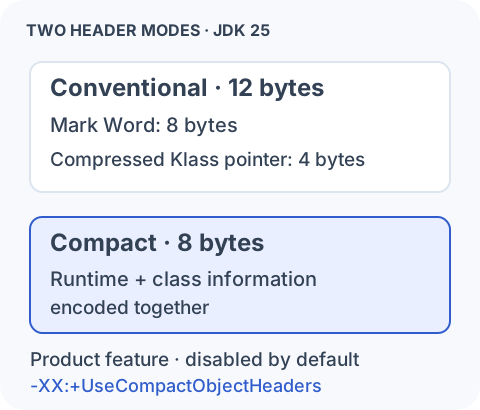
Compact mode encodes runtime state and class information in a smaller header rather than keeping the separate class word shown earlier. The object still needs to identify its class and carry runtime state; the representation changes. JEP 519 documents its JDK 25 status, and JEP 450 explains the layout design.
A four-byte header reduction does not promise a four-byte reduction in every object’s aligned size. Field placement and alignment still apply. For example, even a raw budget of 8 + 9 = 17 bytes rounds to 24 with 8-byte alignment. Measure the actual classes and workload instead of subtracting four from every object in a histogram.
Why a few bytes can matter
For one object, a few bytes rarely deserve much attention. Across a large live population, the same difference becomes substantial. The diagram shows arithmetic for an assumed eight-byte saving per object, not a predicted saving from compact headers.

Large caches, collections, and graphs can contain millions of small objects. Reducing their individual footprint can reduce the live heap needed for the same data. Creating fewer or smaller objects can also reduce allocation volume. The effect on GC work depends on allocation rate, live references, the collector, and the workload; byte savings alone do not predict pause times or RSS changes.
Consider List<Integer>. A typical ArrayList<Integer> uses a backing reference array, and separately allocated Integer wrappers carry their own headers, values, and alignment. Some wrappers can be cached or shared, so there is not necessarily one new wrapper per list entry. A suitable primitive-oriented representation can avoid much of that object and reference overhead without changing the size of an int itself.
From object layout to object graphs
We can now ask two different questions about the heap. Object layout tells us how much one node occupies. An object graph tells us how nodes are connected through references. Follow those connections in the final picture.
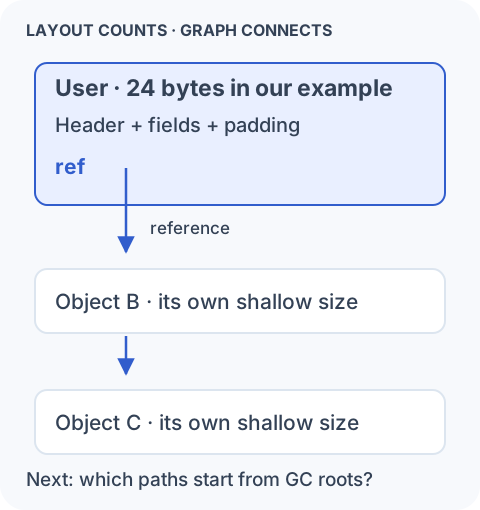
A garbage collector needs to determine which objects must remain alive. An incoming reference by itself is not enough: even a group of objects pointing to one another can be unreachable from the running program. We need starting points and paths, not just object sizes or a count of arrows.
The GC roots, reachability, and graph traversal lesson marks that next step. We’ll move from the inside of one object to the connections that keep objects alive.
Sources and further reading
- JVM specification §2.7: object representation is an implementation choice
- JEP 450: conventional and compact object headers, runtime state, and class encoding
- JEP 519: Compact Object Headers as a JDK 25 product feature, disabled by default
- HotSpot JDK 25 field-layout implementation
- OpenJDK JOL: inspecting object layout and footprint